



 CarTFT.com
Optimus mini three V2.0 *new*
PRODUCT IS CURRENTLY NOT AVAILABLE !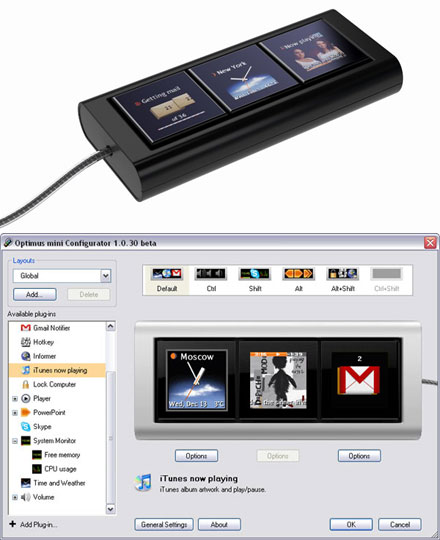
- 3 Buttons
Optimus mini three is an auxiliary keyboard-informer with OLED technology. The three keys can display static or animated images. Optimus mini three keyboard can be used as a toolbar, a remote control, an indicator or an RSS reader.
Functionality
Optimus mini three keys display information associated or independent of the running program. For example, you can be watching a film on your computer, while the keyboard displays a weather forecast, exchange rates or mail notifications.
Optimus mini three works in sync with the regular keyboard and is so configured that its current layout changes as you press the modifier keys (Ctrl, Shift, Alt, and their combinat
[more]


Please tell us your opinion. Rate the product on a scale from 1 to 5. A value of 5 means the best possible rating.
If you want you also can leave a comment.
Your ratings are honored on many ways. Your report will help other customers to better judge about the products. And
you can benefit from reports other customers are giving.
In addition we credit 0.50 EUR for each given rating with comment and 1.00 EUR for each given rating with comment (more than 150 characters)
on your account. The credit will be substracted automatically on your next order !
We reserve us the right to delete given comments (for example on attempts to give comments with senseless content, copying of other comments, inserting of foreign content, abusing the system for financing orders).
"Fair-use-policy" does apply (as of rule of thumb you should give comments for products which you have purchased already. And your credit account only in rare cases will have 2 or even 3 digits). The credit can only be withdrawn by placing an order. It is not possible to get the credit cash or transferred in an other way.
Customer ratings:
 Average rating, based on 6 ratings |
from _Dejan_ am 24.05.2008
| See all my comments
Uau something new :D This is good idea but USB 1.0 connection? If will be posible get it wireless(BT) edition will be great... I think idea is very good...
from MDLemke am 14.05.2008
| 
Tolle Optik
Update from :2008-05-14 18:19
Aber schwere Bugs im Treiber (zumindest mit einem Macintosh): Wacht nach Ruhezustand nicht wieder auf, verliert Teile der Programmierung nach Neustart. In diesem Zustand für mich unbrauchbar - am PC mags anders aussehen.
 from gsflorian am 30.04.2008
| See all my comments
from gsflorian am 30.04.2008
| See all my comments
Could it replace a standard keyboard with the software provided? In case of using a bluetooth device it may be really useful, by configuring each of the three displays to do a phone related task
Schönes Spielzeug. Konzeptionell interessant, aber technisch nicht ausgereift! Wie aus diversen Foren bereits bekannt funktionierte das Gerät auch bei mir an 3 von 4 getesteten PCs (XP) leider nicht. Darunter auch nicht am CarPC, wofür es eigentlich bestimmt war (Vermutung: u. a. Stromprobleme). Für den Preis meines Erachtens nicht akzeptabel.